



What is task planning?
Task planning is the process of making all activities visible, structured, and planned. It’s all about clarity: which tasks need to be done, who will carry them out, and when are they needed?
Professional task planning includes:
- A clear list of tasks
- Priorities and deadlines
- A logical division of tasks
- Insight into capacity and workload
- An overview of task dependencies
With smart task planning, you avoid duplicated work, miscommunication, and time loss.
Why is smart task planning important?
✅ More overview and peace of mind
A good planning provides insight into what needs to be done and when.
✅ Better focus
By planning tasks based on priority, you always work on what’s most important.
✅ Realistic deadlines
Task planning helps you set achievable deadlines and deliver projects on time.
✅ Optimal use of capacity
You can immediately see who has availability, where the bottlenecks are, and how best to divide tasks.
✅ Better collaboration
With one central overview, everyone knows their role and the status of tasks.
How can you plan tasks effectively? (step-by-step plan)
1. Gather all tasks
A good task planning starts with a complete overview. Map out all tasks, from major activities to small subtasks. This can be done through a brain dump or a team meeting. Only when everything is visible can you begin to organise and plan logically.
2. Set priorities
Not every task is equally important. Use methods such as the Eisenhower Matrix or MoSCoW to determine which tasks are urgent and which can wait. This prevents important tasks from being overlooked and helps you plan with purpose.
3. Assign tasks to individuals
Task planning only works if it’s clear who is responsible. Assign each task to one owner. This ensures focus, ownership, and a fairly distributed workload within the team.
4. Plan realistically
Be honest about time and capacity. Take lead times, availability, and unforeseen circumstances into account. A realistic planning prevents stress and makes it easier to meet deadlines.
5. Make task planning visual
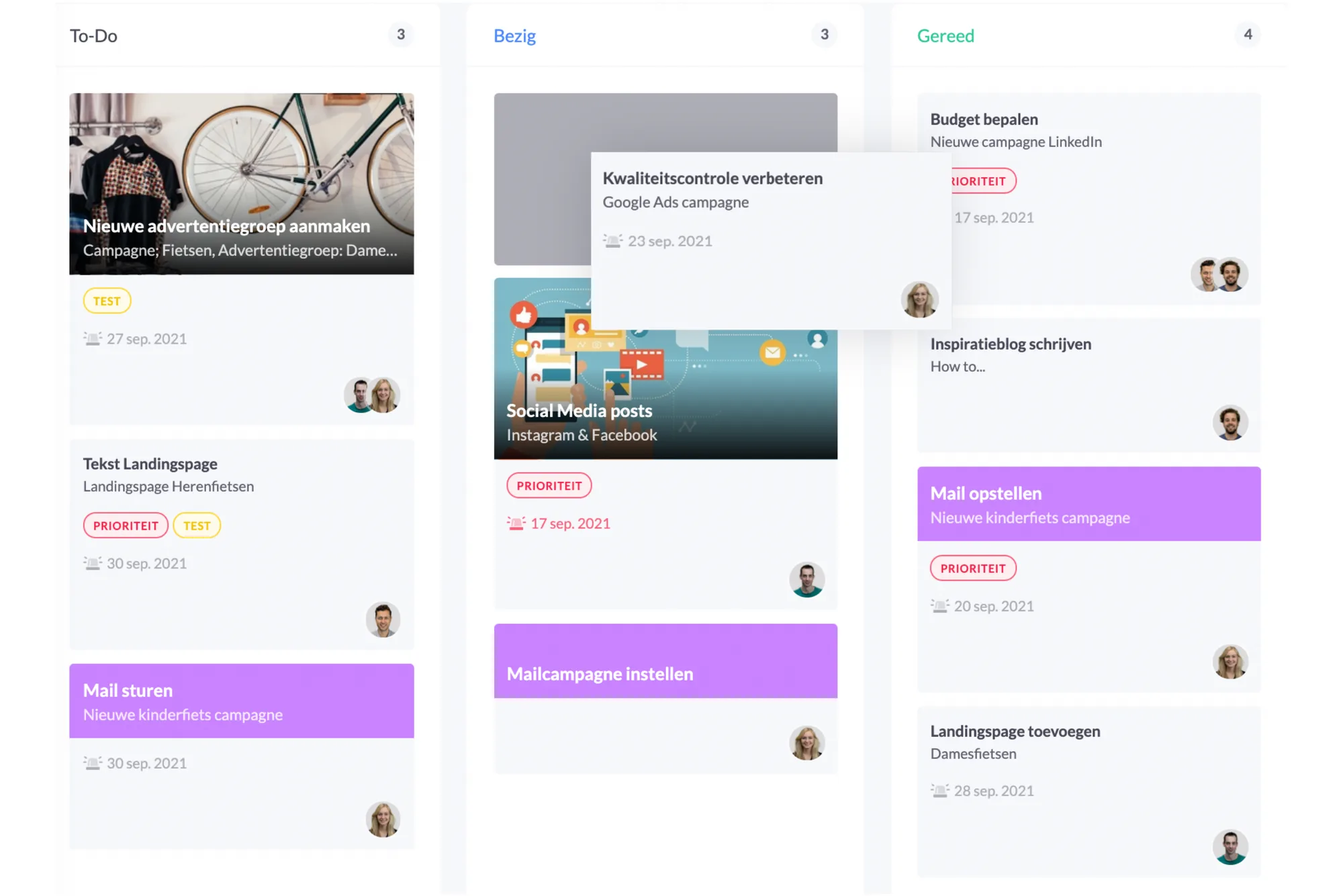
Many teams choose a visual method, such as a Kanban board, to organise tasks. Kanban uses columns like To do, In progress, and Done, allowing you to see at a glance where tasks are and where bottlenecks are forming.
This way of working makes it clear when tasks are getting stuck, who still has capacity, and which activities should be prioritised. That’s why so many organisations use Kanban for daily tasks and individual to-dos.
vPlan fits seamlessly with this: you can build boards in Kanban style, drag and drop tasks, and instantly see which capacity is available. This way, you combine the power of a visual system with the flexibility of smart planning.
6. Evaluate and optimise
A good task planning is never completely fixed. Projects change, priorities shift, and teams learn as they go. That’s why it’s essential to regularly evaluate your planning. Discuss with your team what went well, where the bottlenecks were, and which tasks took more time than expected. Use these insights to plan more smartly in the future.
Planning tasks is not a static process, but a continuous improvement cycle and that’s exactly what makes your planning increasingly effective.
Task planning in practice: how vPlan helps with planning tasks
With vPlan, planning tasks becomes not only easier, but also much smarter. It gives your team one central place where all activities come together, helping you create structure and stay in control of your planning.
📌 One central overview for all tasks
Whether it’s about projects, production, service, or internal tasks: in vPlan, you can see everything clearly in one place. No more switching between separate lists, Excel files, or systems – everything is in one clear planning board.
📌 Plan tasks via drag & drop
Planning tasks feels intuitive and fast. You simply drag tasks to the right day, team member, or phase in the process. This way, you can adjust your planning in seconds and keep everyone instantly up to date.
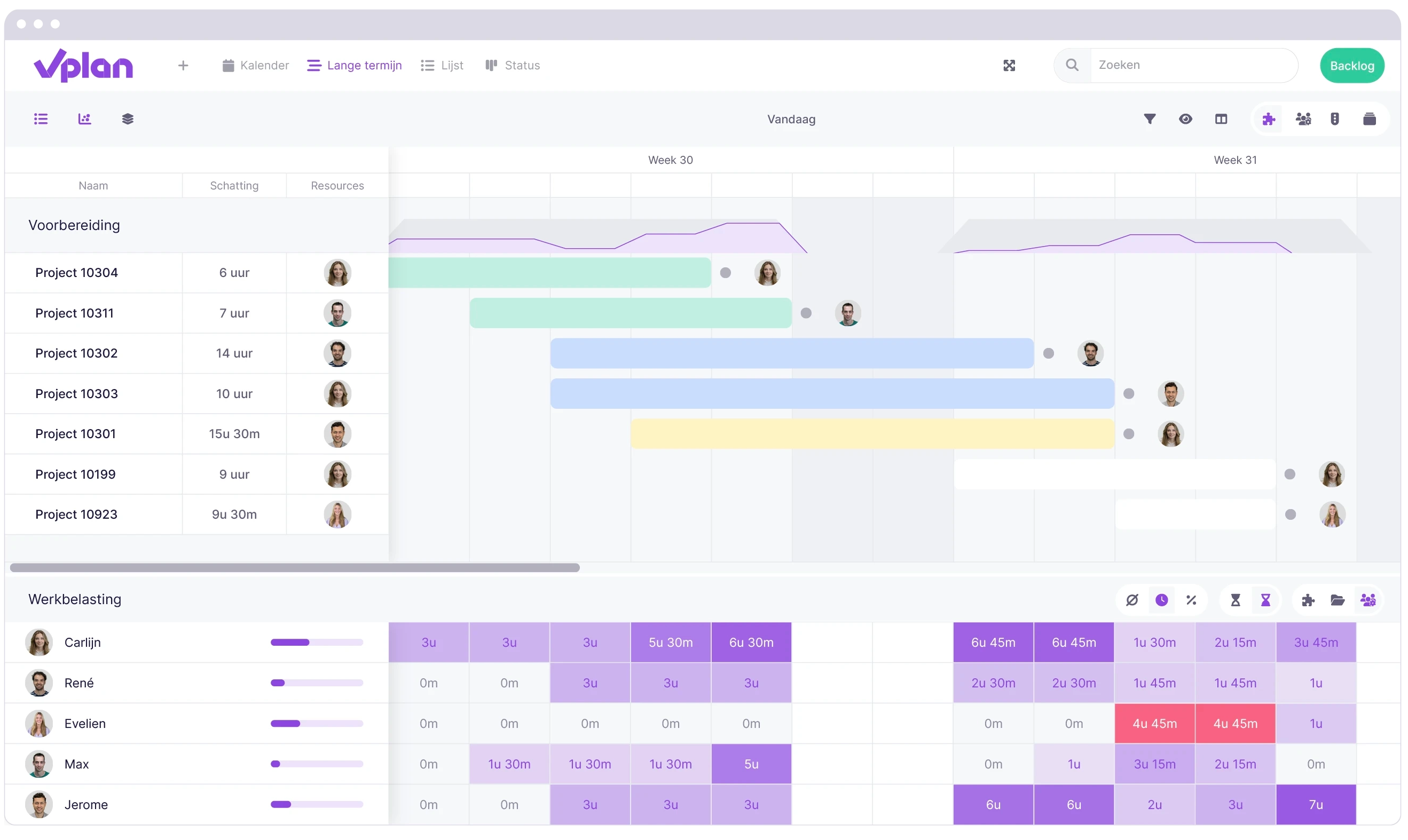
📌 Instant insight into capacity and workload
vPlan shows you exactly who is available, where overload is looming, and which tasks need extra attention. This way, you’re not only planning tasks, but also allocating capacity smartly.
📌 Real-time progress and automatic notifications
Team members can update the status of their tasks instantly, keeping your planning always up to date. Thanks to automatic notifications, team members stay informed about changes and new tasks.
📌 Integration with processes, planning, and systems
Task planning is often connected to other systems and processes. In vPlan, you can easily link tasks to orders, projects, or workflows. This keeps everything in context and allows you to work from a single source of truth, without duplicate work or errors.
"At Unitura, switching from Excel to vPlan led to immediate time savings: work orders come in automatically, teams can see in real time what’s scheduled, and the planning remains error-free and scalable." Read the full story here.
Common mistakes in task planning (and how to avoid them)
⚠️ Tasks without priority
-> Always work with a clear priority matrix.
⚠️ Planning too optimistically
-> Take workload and realistic lead times into account.
⚠️ No owner per task
-> Every task needs one responsible person for clarity.
⚠️ Loss of overview due to Excel
-> Excel becomes outdated quickly and is error-prone; choose a dynamic system like vPlan.
Conclusion: task planning makes the difference
Smart task planning is the key to structure, peace of mind, and an efficient working day. With good task planning, you work purposefully, prevent miscommunication, and stay on top of deadlines.
With vPlan, you plan tasks visually, clearly, and always up to date, exactly how modern teams need it.
👉 Want to experience how vPlan can improve your task planning? Try vPlan for free and discover the power of smart task planning.
Frequently asked questions
Why is effective task planning important?
With well-planned tasks, you avoid miscommunication, workload pressure, and missed deadlines. Teams work more efficiently because they know exactly what has priority and how much time is available.
How do you start with task planning?
Start by gathering all tasks and subtasks. Then determine the priority, assign tasks to the right people, and make the planning visual in a tool or board.
What is the best way to plan tasks in a team?
Use a central tool that gives everyone real-time insight into tasks, capacity, and deadlines. Visual planning, such as with boards or cards, is the clearest method for teams.
How does vPlan help with task planning?
vPlan offers one overview for all tasks, real-time updates, insight into capacity, and visual planning. This allows you to plan faster and avoid errors or duplicate administration.
What is the difference between planning tasks in Excel and in vPlan?
Excel becomes outdated quickly and doesn’t provide insight into capacity or status updates. vPlan works in real time, is visual, and prevents errors by managing tasks centrally and dynamically.
How do you ensure task planning remains achievable?
Regularly evaluate your planning, monitor the team’s capacity, and make adjustments where needed. Keep the planning realistic and allow room for unexpected tasks.
What does good task planning deliver for my organisation?
You gain more structure, higher productivity, better collaboration, and less ad-hoc work. It helps teams consistently meet deadlines and distribute work more smartly.

Work at vPlan
We are looking for new colleagues.


