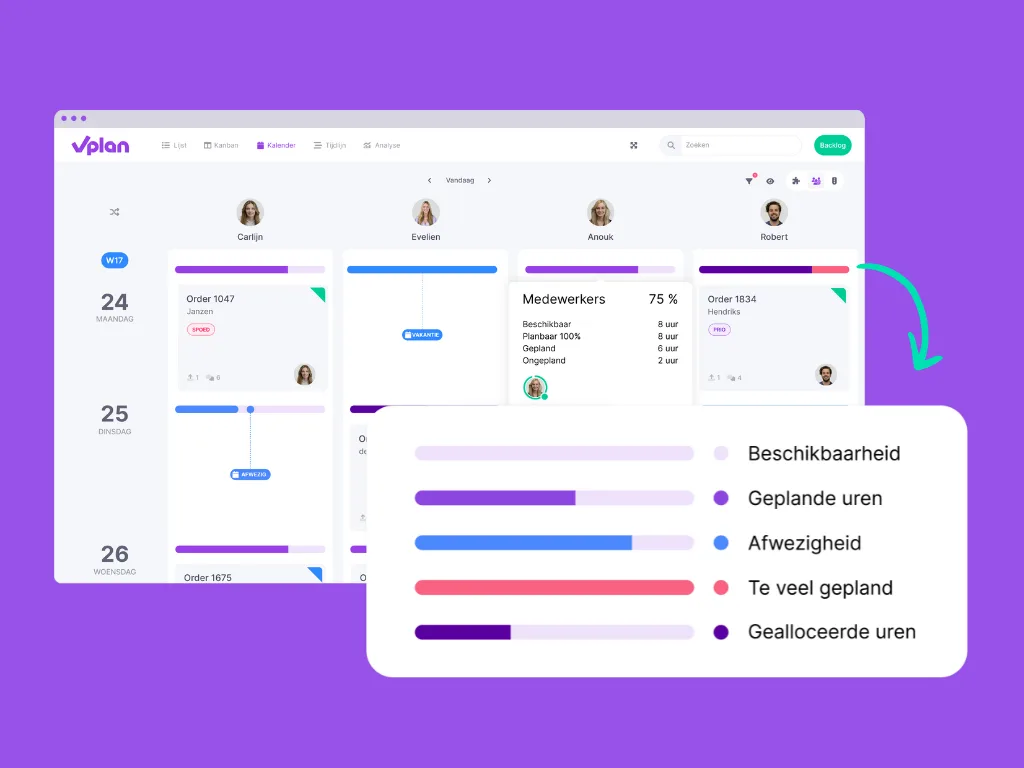
Our developments have led to a fresh update of the capacity features, with new colours, a clearer display, and faster performance. Small changes with a big impact. We want to prepare you for what's coming.
Purple is the New Colour of Capacity
We have decided to bring more consistency to the colours within vPlan. What does this mean in the timeline?
Capacity in the Timeline
Availability remains light grey as always. If a resource is (partially) unavailable due to leave or absence, this will be shown in blue.

Scheduled hours are now displayed with a purple line, filled with a light purple colour. This provides a clearer contrast and better shows how 'full' someone's schedule is.
If your scheduled time exceeds your available time, this will be marked in red. New is the dark purple colour for shared capacity, which means the resource is already scheduled on another board for several hours.
Workload in the Timeline
The workload view offers a new way to gain insight into capacity. The colours in this view are consistent with the capacity bar in the timeline. Light grey represents availability, scheduled hours range from light purple to dark purple. The darker the colour, the 'fuller' the schedule. A box turns red if scheduled time exceeds available hours.
Calendar
To remain consistent, these colours have also been applied to the calendar view. Scheduled hours are purple. When you plan beyond available hours, the capacity bar turns red. Dark purple means the resource is already (partially) scheduled on another board. Absence remains light blue as always.

The 'orange' colour is no longer available and can no longer be set. This was only possible at the stage level and not at the resource level.
We hope these changes help you gain better insight into your capacity and workload. If you have any questions about these new features or how they work, please don't hesitate to contact us!
Try it in your own vPlan
Every new feature is in the free trial.