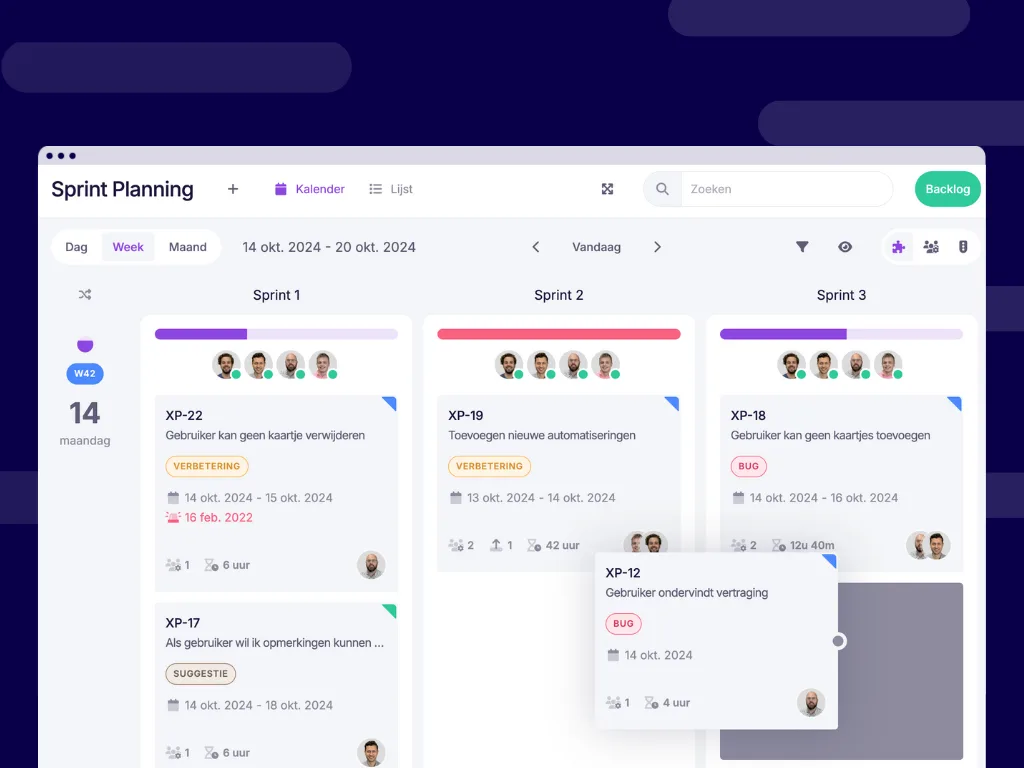
Freely move cards between stages ⛓️
Previously, it wasn’t possible to move a card from one stage to another. This meant that the workflow for each card was strictly tied to the stage in which it was created. However, with the latest update, you can now easily drag and drop cards without activities between stages, making your workflow much more flexible.
Benefits:
- Flexibility: You can quickly respond to changes in your planning by easily moving cards without activities between stages.
- Efficiency: There’s no longer a need for extra actions, such as assigning activities, to move your cards. This saves time and streamlines the process.
Use case: Imagine you’re using a board for sprint planning, where each stage represents a sprint, such as “Sprint 1”, “Sprint 2”, and “Sprint 3”. An issue (card) is created in “Sprint 1”, but during a planning session, you decide to move it to “Sprint 2” because priorities have changed. With the new feature, you can easily drag this card to the next sprint without needing to link any activity to it, making your planning more flexible and efficient.
Link activities to multiple stages 🪄
Another powerful new feature is the ability to link a single activity to multiple stages. Previously, an activity could only be assigned to one stage, which limited the ability to move cards associated with that activity. Now, you can move cards with an activity to any stage where that activity is active, offering more flexibility and control over complex workflows.
Benefits:
- More control: You can now run activities across multiple stages, which is ideal for tasks that require attention in different stages.
- Transparency: You gain better insight into the progress of activities active in multiple stages, helping you track long or overlapping processes.
Use case:
Suppose you’re managing a project board for a large IT implementation project. The activity “Project Management” needs to be carried out in every stage of the project, from “Initiation” and “Planning” to “Execution” and “Delivery”. Now, you can link the “Project Management” activity to all these stages, allowing the project management team to track progress and perform actions in every stage. This keeps project management consistently present, no matter which stage the project is in. Your team gains a clear overview and control over the entire process, without having to recreate the activity each time.
Try it in your own vPlan
Every new feature is in the free trial.