



Filter in list view
With Filter, it is possible to show relevant cards quickly and easily. It is very handy when you have a large number of cards because nobody likes to scroll.
The new option can be found at the top of the list view. When you click on the filter, a menu appears with the options. You can filter on the following data:
- Phases
- Statuses
- Resources
- Labels
- Date
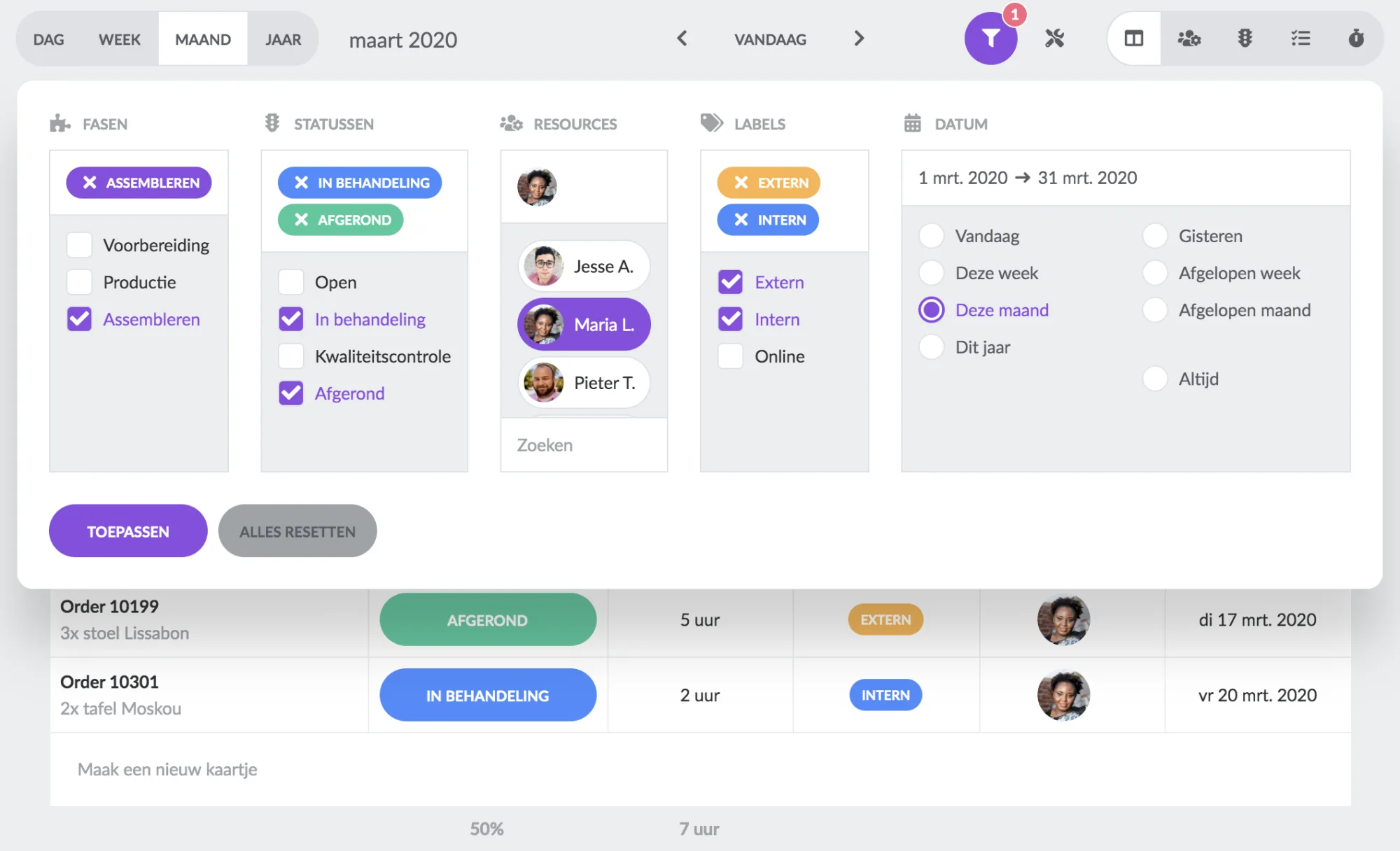
When you apply a specific filter, only the cards that match your settings will be shown. Select data from different columns to search even more specifically.
Extra: Previously, the list view was always time-limited (day, week and month). It is now also possible to enable the "Always" option at the date. This allows you to see all the cards on your board. Because of optimal performance, the first 50 cards are shown. Click on "Show" at the bottom of the list to load all cards.
New columns
New columns are available in the list view:
Week number
Based on the start date of the card, we show the corresponding week number.
Order status (integration)
We show the status of the linked order from the integration with your ERP or other software.
Soon available
We are not standing still. Our roadmap already contains new developments about the list view. One of these developments is "Saved Filters". This allows you to quickly choose from filters you have saved yourself. For example, create a standard filter for all tickets, with which you are linked as a resource.
Try it in your own vPlan
Every new feature is in the free trial.



