


1. AFAS and vPlan: what exactly do they do?
You’re undoubtedly already familiar with AFAS, but we’d still like to briefly introduce both AFAS and vPlan before diving deeper into the integration.
AFAS Profit
AFAS Profit is a flexible and powerful ERP system that helps organisations with HRM, payroll, CRM, document management, project administration, and financial management. Thanks to its versatility, it can be used broadly.
vPlan
vPlan is the visual planning solution for production, projects, service, and more. You can collaborate, plan, and communicate in real-time, all in one clear tool. The integration with AFAS creates a single digital workflow.
2. What are the benefits of the combination between AFAS and vPlan?
We hear you thinking: What exactly does an integration between AFAS and vPlan offer me? We’ll explain it all in detail.
✅ Time savings & automation
No more manually copying information: project data flows automatically from AFAS into your planning.
✅ Accurate data & fewer errors
Double entry is a thing of the past. The integration between vPlan and AFAS ensures that information is not transferred incorrectly or incompletely.
✅ Insight into costs & performance
Thanks to smart pre- and post-calculations, you know exactly where you stand, before and after execution.
✅ Fully digital planning
A paperless working environment with real-time updates. Good for the environment and your efficiency.
✅ Improved team communication
Sales and production data are immediately visible to everyone. No loose notes, just clarity.
3. How does the integration between vPlan and AFAS work?
That all sounds very good, doesn't it? But how does it work in practice? Of course, we are happy to explain that too. With a link between AFAS and vPlan, you get project or order information directly from AFAS into your planning in vPlan.
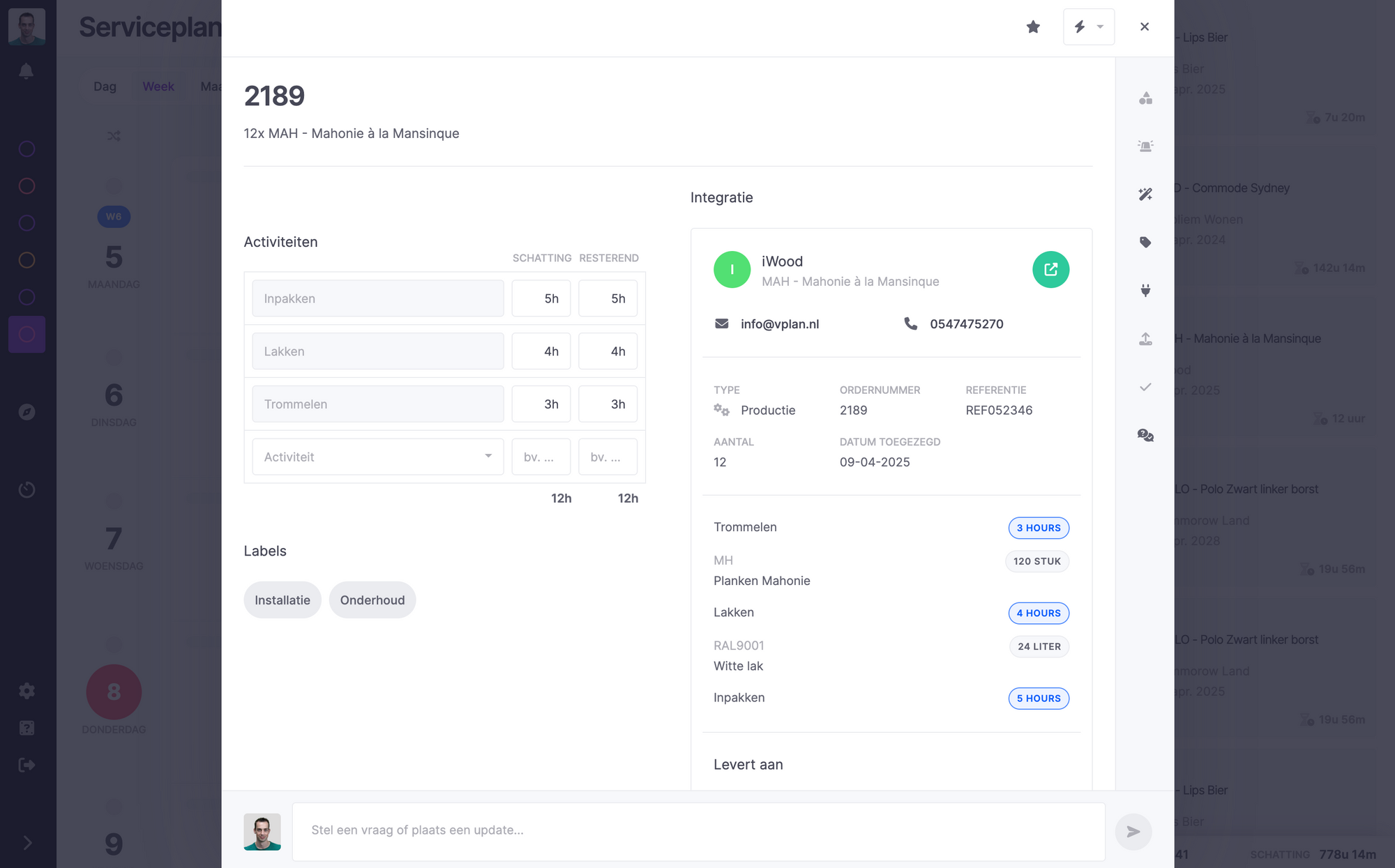
Your production orders, sales orders, projects, quotations or work orders are transferred to vPlan via the link. Tickets are created in vPlan for this purpose. Information from AFAS such as articles, work types, pre-calculations and sales relations are added to the ticket in vPlan.
In the image below, the left-hand side shows the work types from AFAS as activities in vPlan. On the right-hand side, you can see the other information.
It is also possible to expand this with the schedule, leave and absence of employees. This way, you always have the right available capacity in vPlan. And that certainly comes in handy when scheduling!
You can also easily send post-calculations from vPlan back to AFAS. vPlan can also be linked to the AFAS Pocket App.
4. Customer stories: how other companies combine AFAS and vPlan
If you’re not fully convinced yet, let others convince you! Below you’ll find experiences from customers who have been working with vPlan in combination with AFAS for some time.
Brunink Group
“Our planning meeting, which used to take 2.5 hours on Monday morning, has now been reduced to just fifteen minutes. Thanks to more efficient working methods, we have more time for important tasks.”
👉 Read the full customer story of Brunink Group.CBT
“Previously, colleagues kept their own planning or agenda in addition to the Excel document. As a result, there was often uncertainty about who was actually available. That is now always clear and visible.”
👉 Read the full story of CBT.Sempergreen
“We worked with many separate lists, tasks, and worksheets in Excel. Now we have everything in one place in vPlan. And we only need to meet once a week.”
👉 Read the full customer story of Sempergreen.
Can’t get enough? Read more experiences here.
Start today with efficient AFAS planning via vPlan
Stop using Excel sheets and manual tasks. Automate your work with the powerful integration between vPlan and AFAS. Save time, work error-free, and gain real-time control over your planning. Find more information about our integrations here.
🚀 Curious about the possibilities? Get in touch with us!

Work at vPlan
We are looking for new colleagues.


